
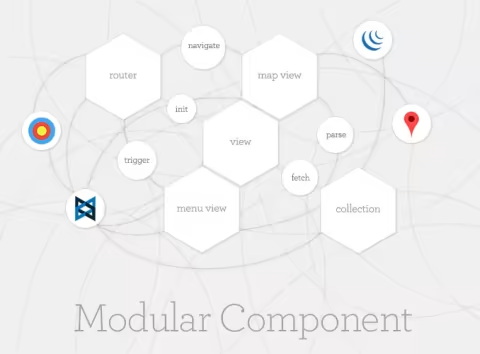
身為一名網頁開發者,我過去做過不少高度依賴 JavaScript 的網站。大多時候,我只是用單一一個 JavaScript 檔案,加上一堆 jQuery 外掛來完成工作。隨著專案越做越大,最後就變成一大坨難以維護的 JavaScript,整體結構非常混亂。
直到最近,我開始考慮使用框架或架構設計模式來整理我的程式碼。因此這是我的第一步:嘗試整合一些新興、有用的 JavaScript 工具,來建立一個以地圖為基礎的網頁應用程式。而我選用的工具包括:
一開始其實很簡單,只需要加入:
<script data-main="js/core" src="/js/libs/require.js"></script>
事實上,這會是 HTML 頁面中唯一需要引入的 JavaScript 檔案。
注意這裡的 js/core,它會作為核心腳本,負責初始化設定並啟動整個應用程式。
require.config({
   baseUrl: "js",
   paths: {
       jquery: 'libs/jquery-1.8.2.min',
       modernizr: 'libs/modernizr-2.6.1-respond-1.1.0',
       underscore: 'libs/underscore',
       backbone: 'libs/backbone',
       gmap:'libs/gmap',
       async: 'libs/async',
       text: 'libs/text',
       templates: '../templates'
   },
   'shim':{
       backbone:{
           'deps' :['jquery' ,'underscore'],
           'exports' : 'Backbone'
       },
       modernizr:{
           'exports' : 'Modernizr'
       },
       underscore: {
           'exports': '_'
       }
   },
   waitSeconds: 0,
   urlArgs: ''
});

require([
   'app'
], function(App){
   App.initialize();
});
將所有 JavaScript 函式庫集中放在 /js/libs 目錄下,並透過 paths 設定讓應用程式知道各個函式庫的位置。接著建立一個名為 app.js 的檔案,作為 MVC 元件的入口,並呼叫 initialize 函式。
define(['routers/home'], function(router){
   var initialize = function(){
       this.router = new router();
   }
   return { initialize: initialize};
});
接著設定應用程式的控制器(Router),並進行初始化。
define([
   'jquery',
   'backbone',
   'underscore',
   'views/menuview',
   'views/mapview'],
   function($, Backbone, _, menuView, mapView){
       var Router = Backbone.Router.extend({
           initialize: function(){
               this.menuView = new menuView;
               this.menuView.bind('collectionSelected',this.setLocation, this);

               this.mapView = new mapView;
               this.mapView.render();
               Backbone.history.start({pushState: true, root:'/'});
           },
           routes: {
               '':'setLocation',
               'places/*name': 'getLocation'
           },
          setLocation: function(e){
               if (e){Backbone.history.navigate('places/'+e.get('name').replace(' ','+'), false);}
               this.mapView.updateMap(e);
           }
           ,
           getLocation: function(e){
               this.menuView.updateModel(e);
           }
       });

       return Router;
   });
這個控制器(Router)可以監聽傳入的參數,並指示各個 View 去取得對應的資料集合,然後將資料分別傳給兩個 View:menuView(地點選擇清單)以及 mapView(內嵌 Google 地圖的視圖)。
define([
   'jquery',
   'underscore',
   'backbone',
   'models/model'
], function($, _, Backbone, mapModel){
   var mapCollection = Backbone.Collection.extend({
       initialize: function(){
       },
       model: mapModel,
       url: '/js/services/places.json',
       parse:function(response){
           return response;
       }
   });

   return mapCollection;
});
Collection 只是從一個靜態 JSON 檔案抓取資料,這裡我簡單放了我最近去過的四個國家,以及它們的經緯度。
define([
   'jquery',
   'underscore',
   'backbone',
   'gmap',
   'collections/collection',
   'text!templates/map.html'
], function($, _, Backbone, googleMap, mapCollection, mapTemplate){

   var MapView = Backbone.View.extend({
       el: '#map',
       template:_.template(mapTemplate),
       initialize: function(){
           var map;
       },
       updateMap:function(e){
           if (!e) {this.createMap();}
           else {map.setCenter( new google.maps.LatLng(e.get('lat'), e.get('lng') ));}
       },
       createMap:function(){
           if (navigator && navigator.geolocation) {
               navigator.geolocation.getCurrentPosition(
                   function(position) {
                       var pos = new google.maps.LatLng(
                           position.coords.latitude,
                           position.coords.longitude
                       );
                       map.setCenter(pos);
                   }, function(e) {
                       switch(e){
                           case 1:
                               console.log('使用者拒絕提供定位資訊。');
                               break;
                           case 2:
                               console.log('無法取得定位資訊。');
                               break;
                           case 3:
                               console.log('取得定位資訊逾時。');
                               break;
                           default:
                               console.log('預設錯誤');
                       }
                   });
           }
       },
       render: function(){
           this.$el.html(this.template);

           map = new google.maps.Map($('#map_canvas')[0], {
               zoom: 12,
               position: new google.maps.LatLng(null, null),
               mapTypeId: google.maps.MapTypeId.ROADMAP
           });
       }
   });
   return MapView;
});
我使用了 Miller Medeiros 提供的 RequireJS Plugins(這裡),來呼叫 Google Maps API 並渲染地圖。
define([
   'jquery',
   'underscore',
   'backbone',
   'collections/collection',
   'text!templates/menu.html'
], function($, _, Backbone, mapCollection, mainTemplate){
   var MenuView = Backbone.View.extend({
       el: '#menu',

       events:{
         'click a': "selectPlace"
       },

       initialize: function(){
           this.collection = new mapCollection();
           this.collection.fetch();
           this.collection.bind("reset", function(){this.render();}, this);
       },

       render: function(){
           var placeModels = {
               data: this.collection.models
           }

           this.$el.html(_.template(mainTemplate, placeModels));
       },

       updateModel:function(e){
           var place = e.replace('+', ' ');
           var self = this;
           this.collection.fetch({
               success:function(data){
                   _.find(data.models, function(el){
                       if(el.get('name')==place){
                           $('li:nth('+self.collection.indexOf(el)+')').delay(500).addClass('active');
                           self.trigger("collectionSelected", el);
                       }
                   });
               }
           });
       },

       selectPlace:function(e){
           e.preventDefault();
           this.$el.find('li').removeClass('active');
           $(e.currentTarget).parent().addClass('active');
           var index = $('li a').index(e.currentTarget);
           this.trigger("collectionSelected", this.collection.models[index]);
       }
   });
   return MenuView;
});
Menu View 會抓取 collection,並透過加上 active class 來標示目前選取的項目。
以上就是一個可運作的地圖應用程式。