
As a web developer, I have been doing a lot of websites that rely on javascript heavily. And most of the time, I just build the website with only one javascript, with plenty of jquery plugin, to get the job done. Then, it ends up with a massive chunk of javascript when the project getting bigger and bigger, which is a big mess.
Until lately, I thought about using a framework, an architectural design pattern to help me to tidy up my scripts. So here's my first step, try to collaborate some of the rising, new, and useful javascript tools, to create a map based web app. And the tools that's in my scope are:
So the starting is quite easy, just insert
<script data-main="js/core" src="/js/libs/require.js"></script>
And in fact that will be the only javascript files needed for the HTML page.
Notice the js/core, that would be the core script to do the initial configuration and fire up the web app.
require.config({
   baseUrl: "js",
   paths: {
       jquery: 'libs/jquery-1.8.2.min',
       modernizr: 'libs/modernizr-2.6.1-respond-1.1.0',
       underscore: 'libs/underscore',
       backbone: 'libs/backbone',
       gmap:'libs/gmap',
       async: 'libs/async',
       text: 'libs/text',
       templates: '../templates'
   },
   'shim':{
       backbone:{
           'deps' :['jquery' ,'underscore'],
           'exports' : 'Backbone'
       },
       modernizr:{
           'exports' : 'Modernizr'
       },
       underscore: {
           'exports': '_'
       }
   },
   waitSeconds: 0,
   urlArgs: ''
});

require([
   'app'
], function(App){
   App.initialize();
});
Gather all the javascript libraries and put them all into /js/libs, and the let the app knows where's the libraries by configure the paths. Create a js file called app.js, that would be the gateway for the MVC components to the app. And then call the initialize function.
define(['routers/home'], function(router){
   var initialize = function(){
       this.router = new router();
   }
   return { initialize: initialize};
});
Set up the controller of the app - Router, and initialize it as well.
define([
   'jquery',
   'backbone',
   'underscore',
   'views/menuview',
   'views/mapview'],
   function($, Backbone, _, menuView, mapView){
       var Router = Backbone.Router.extend({
           initialize: function(){
               this.menuView = new menuView;
               this.menuView.bind('collectionSelected',this.setLocation, this);

               this.mapView = new mapView;
               this.mapView.render();
               Backbone.history.start({pushState: true, root:'/'});
           },
           routes: {
               '':'setLocation',
               'places/*name': 'getLocation'
           },
          setLocation: function(e){
               if (e){Backbone.history.navigate('places/'+e.get('name').replace(' ','+'), false);}
               this.mapView.updateMap(e);
           }
           ,
           getLocation: function(e){
               this.menuView.updateModel(e);
           }
       });

       return Router;
   });
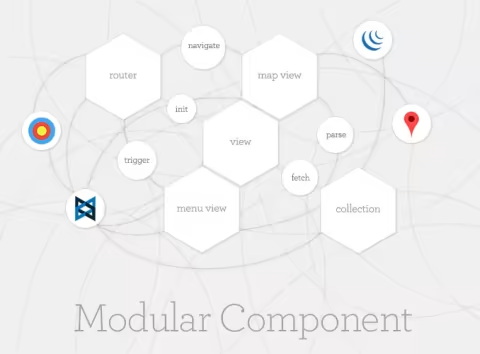
For the controller (Router), it would be able to listen to the argument being passed, command the views to fetch its collection, and then inject the information to the two views that needed in this example - menuView, the selector, list menu of places view, and mapView, the view which embedded with the Google Map.
define([
   'jquery',
   'underscore',
   'backbone',
   'models/model'
], function($, _, Backbone, mapModel){
   var mapCollection = Backbone.Collection.extend({
       initialize: function(){
       },
       model: mapModel,
       url: '/js/services/places.json',
       parse:function(response){
           return response;
       }
   });

   return mapCollection;
});
The collection just fetch a static JSON document, I'll just put four last country that I've been to with its corresponding latitude and longitude.
define([
   'jquery',
   'underscore',
   'backbone',
   'gmap',
   'collections/collection',
   'text!templates/map.html'
], function($, _, Backbone, googleMap, mapCollection, mapTemplate){

   var MapView = Backbone.View.extend({
       el: '#map',
       template:_.template(mapTemplate),
       initialize: function(){
           var map;
       },
       updateMap:function(e){
           if (!e) {this.createMap();}
           else {map.setCenter( new google.maps.LatLng(e.get('lat'), e.get('lng') ));}
       },
       createMap:function(){
           if (navigator && navigator.geolocation) {
               navigator.geolocation.getCurrentPosition(
                   function(position) {
                       var pos = new google.maps.LatLng(
                           position.coords.latitude,
                           position.coords.longitude
                       );
                       map.setCenter(pos);
                   }, function(e) {
                       switch(e){
                           case 1:
                               console.log('The user denied the request for location information.');
                               break;
                           case 2:
                               console.log('Your location information is unavailable.');
                               break;
                           case 3:
                               console.log('The request to get your location timed out.');
                               break;
                           default:
                               console.log('default');
                       }
                   });
           }
       },
       render: function(){
           this.$el.html(this.template);

           map = new google.maps.Map($('#map_canvas')[0], {
               zoom: 12,
               position: new google.maps.LatLng(null, null),
               mapTypeId: google.maps.MapTypeId.ROADMAP
           });
       }


   });
   return MapView;
});
I'm using the RequireJS Plugins provided by Miller Medeiros here to make a call from Google Map API and render the map.
define([
   'jquery',
   'underscore',
   'backbone',
   'collections/collection',
   'text!templates/menu.html'
], function($, _, Backbone, mapCollection, mainTemplate){
   var MenuView = Backbone.View.extend({
       el: '#menu',

       events:{
         'click a': "selectPlace"
       },

       initialize: function(){
           this.collection = new mapCollection();
           this.collection.fetch();
           this.collection.bind("reset", function(){this.render();}, this);
       },

       render: function(){
           var placeModels = {
               data: this.collection.models
           }

           this.$el.html(_.template(mainTemplate, placeModels));
       },

       updateModel:function(e){
           var place = e.replace('+', ' ');
           var self = this;
           this.collection.fetch({
               success:function(data){
                   _.find(data.models, function(el){
                       if(el.get('name')==place){
                $('li:nth('+self.collection.indexOf(el)+')').delay(500).addClass('active');
                           self.trigger("collectionSelected", el);
                       }
                   });
               }
           });
       },

       selectPlace:function(e){
           e.preventDefault();
           this.$el.find('li').removeClass('active');
           $(e.currentTarget).parent().addClass('active');
           var index = $('li a').index(e.currentTarget);
           this.trigger("collectionSelected", this.collection.models[index]);
       }
   });
   return MenuView;
});
Menu View fetch the collection as highlight the current selection by adding an active class.
That's it, for a working map app.